2026/04/27 Mon.
| X | ● 개인과제 |
| O | |
| X | ● 머신러닝 심화 완강 |
| ↓ 주간 목표 ↓ | |
| ● 개인과제 제출 ● 자격증 공부 |
|
⊙ 머신러닝 심화 1강
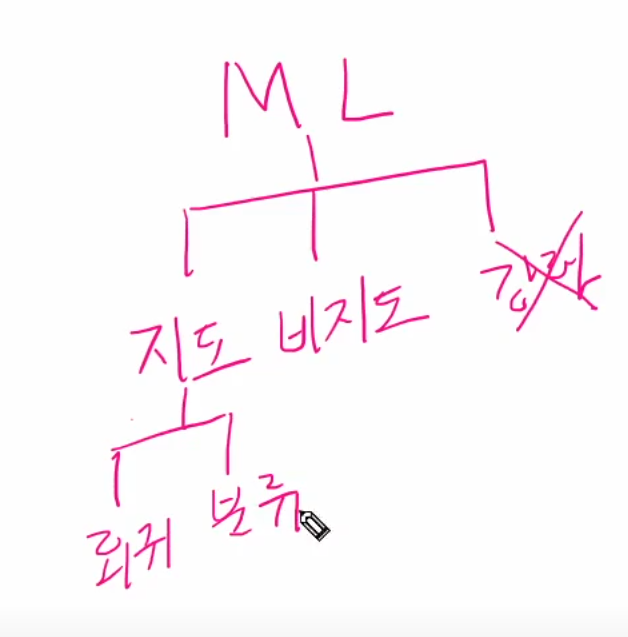
● 1-1 데이터 수집

실제로 데이터를 수집하려면 개발을 통해 데이터를 적재하고 수집하는 데이터 엔지니어링 역량이 필요
이 부분은 개발자가 직접 설계하고 저장
데이터 분석가는 이미 존재하는 데이터가 있다면 정제, 추출, 리포팅하는 역할 / 머신러닝을 통한 예
를 SQL 혹은 Python 로 통해 추출하고 리포팅 혹은 머신러닝을 통한 예측을 담당
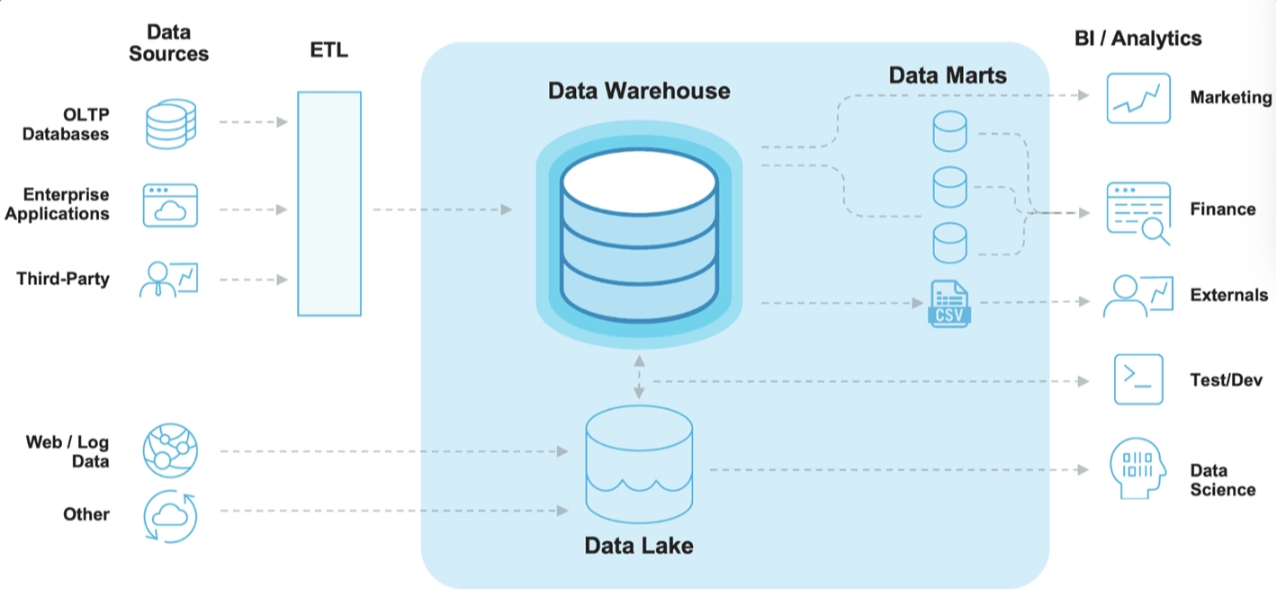
1. Data Source
- OLTP DataBase : OnLine Transaction Processing은 온라인 뱅킹, 쇼핑, 주문 입력 등 동시에 발생하는 다수의 트랜잭션 처리 유형
(트랜잭션 : 데이터 베이스의 데이터 수정, 입력, 삭제 과정 || 데이터베이스 작업의 단위) - Enterprise Applications: 회사 내 데이터 (ex 고객 관계 데이터, 제품 마케팅 세일즈)
- Third - Party: Google Analytics와 같은 외부소스에서 수집되는 데이터
- Web/Log: 사용자의 로그데이터
- ETL = 추출(Extract)-변환(Transform)-로드(Load)
2. Data Lake
- 원시 형태의 다양한 유형의 데이터를 저장
- = 원천데이터 저장
3. Data Warehouse
- 보다 구조화된 형태로 정제된 데이터 저장
4. Data Marts
- 회사의 금융, 마케팅, 영업 부서와 같이 특정 조직의 목적을 위해 가공된 데이터
- =특정 조직을 위한 목적성을 가지고 가공한 데이터
5. BI / Analytics
- Bisiness Intelligence는 의사 결정에 사용될 데이터를 수집하고 분석하는 프로세스
실제 데이터 수집
- 회사 내 데이터가 존재한다면
- SQL 혹은 Python 을 통해 데이터 마트를 생성
- = 목정성을 가지고 가공한 데이터 생성
- 회사 내 Data가 없다면 → 데이터 수집 필요
- 방법1: CSV, EXCEL 파일 다운로드
- 방법2: API를 이용한 데이터 수집
= API : Application Programming Interface 두 소프트웨어 간에 의사소통
= 구격화된 형태로 의사소통 하는 것
ex) 공공데이터 API - 방법3: Data Crawling
● 1-2 EDA
- 탐색적 데이터 분석(Exploratory Data Analysis, EDA)
: 데이터의 시각화, 기술통계 등의 방법을 통해 데이터를 이해하고 탐구하는 과정 - 이 과정에서 데이터에 대한 정보(범주형, 수치형, 데이터 결측치 등,,,)를 얻을 수도 있는 예측 모델링이 아니더라도 데이터 분석에서는 반드시 필요한 과정
- .dscribe() - include=all
# include=all : 옵션 / 범주형 데이터 확인 가능
☑️ EDA 예시 : 관측치 / 범주형 / 연속형
☑️ count plot
- count = 자료 개수
- 범주형 자료의 빈도 수 시각화
- 범주형의 데이터의 각 카테고리별 빈도수를 나타낼 때
- x축: 범주형 자료 | y축: 자료의 빈도수
☑️ bar plot
- 범주형 자료의 시각화
- 주형 데이터의 각 카테고리에 따른 수치 데이터의 평균을 비교
- x축: 범주형 자료 | y축: 연속형 자료
count plot |
bar plot |
카테고리(=범주) 별 개수 |
카테고리(=볌주) 별 수치(평균, min, max 등,,,) 데이터
|
☑️ box plot
- 수치형 & 범주형 자료의 시각화
- 데이터의 분포, 중앙값, 사분위 수, 이상치 등을 한눈에 표현하고 싶을 때 → 평균X 중앙값!!
- x: 수치형 or 범주형 | y: 수치형 자료
☑️ histogram
- 수치형 자료 빈도 시각화
- 연속형 분포를 나타내고 싶을 때, 데이터가 몰려있는 구간을 파악하기 쉬움
- x축: 수치형 자료 | y축: 자료의 빈도수
☑️ scatter plot
- 수치형끼리 자료의 시각화
- 두 연속형 변수간의 관계를 시각적으로 파악하고 싶을 때
- x축: 수치형 자료 | y축: 수치형 자료
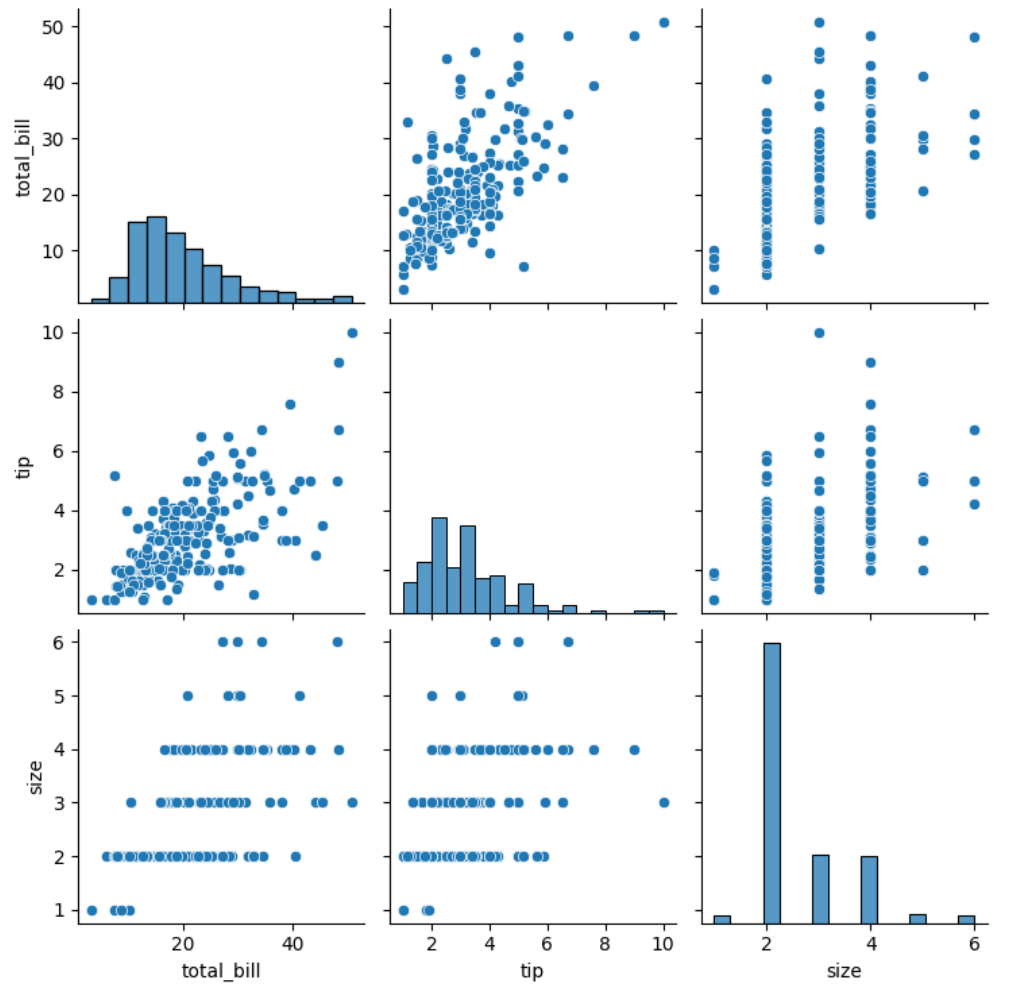
☑️ pair plot
- 전체 변수에 대한 시각화
- 한 번에 여러 개의 변수를 동시에 시각화 하고 싶을 때
- x축: 범주형 or 수치형 자료 | y축: 범주형 or 수치형 자료 | 대각선: 히스토그램(분포)

☑️ 실습
더보기
|
import seaborn as sns
import matplotlib.pyplot as plt
import pandas as pd
|
|
|
tips_df = sns.load_dataset('tips')
tips_df.head(3)
|
 |
|
tips_df.describe(include='all')
# 그냥 .describe는 수치형 데이터만 보여주므로
# include all을 해야 범주형도 다 보임
# 범주형의 최빈값을 볼 수 있으므로
# 이를 대표값으로 활용할 수 있음
|
 |
|
**X,Y축에 필요한 정보를 넣어서 시각화**
**범주형, 연속형, 관측(Y축)**
|
|
|
# count plot : x 축- 범주형 | y축-관측치
sns.countplot(data=tips_df, x = 'day', color='skyblue')
|
 |
|
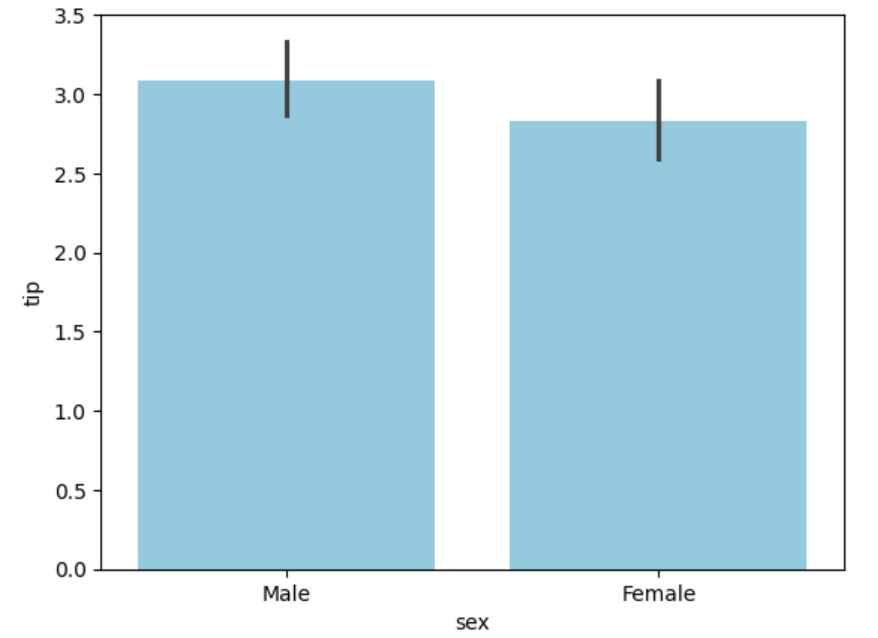
# bar plot : x축-범주형 | y축-연속형 값
sns.barplot(data=tips_df, x='sex', y='tip', color='skyblue')
# 옵션을 넣지 않으면 **평균**으로 자동 계산
|
 |
|
# bar plot 합
# estimator 뜻 추정량
sns.barplot(data=tips_df, x = 'sex', y='tip', estimator='sum', color='skyblue')
|
 |
|
#box plot
sns.boxplot(data=tips_df, x='time', y='total_bill')
|
 |
|
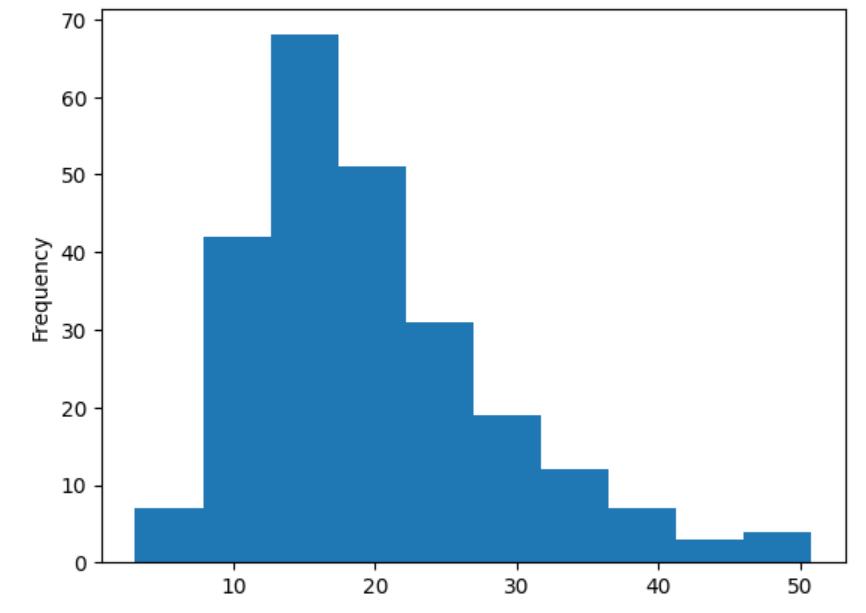
# histogram
# bins : 간격 기본값 auto - 따로 설정해야함
sns.histplot(data=tips_df, x='total_bill', bins=10, color='skyblue')
|
 |
|
tips_df['total_bill'].plot.hist()
|
 |
|
# x축-수치형
# y축-수치형
sns.scatterplot(data=tips_df, x='total_bill', y='tip', color='skyblue')
#뭉쳐있다는 느낌은 있으나 얼마나 뭉쳐있는지 알 수 없음
# → 분포를 봐야함
|
 |
|
#pair plot
sns.pairplot(data=tips_df)
# only 수치형 데이터
# 범주형 데이터가 없음
|
 |
● 1-4 (전처리) 이상치
데이터 전처리는 전체 분석 프로세스에서 90%를 차지 할 정도로 노동, 시간 집약적인 단계
☑️ 이상치 Outlier
:이상치(Outlier)란 보통 관측된 데이터 범위에서 많이 벗어난 아주 작은 값 혹은 큰 값을 말해요.
- Extreme Studentized Deviation(ESD) 이용한 이상치 발견
- 데이터가 정규분포를 따른다고 가정할 때, 평균에서 표준편차의 3배 이상 떨어진 값
- 모든 데이터가 정규 분포를 따르지 않을 수 있기 때문에 다음 상황에서는 제한됨
: 데이터가 크게 비대칭일 때( → Log변환 등을 노려볼 수 있음)
: 샘플 크기가 작을 경우
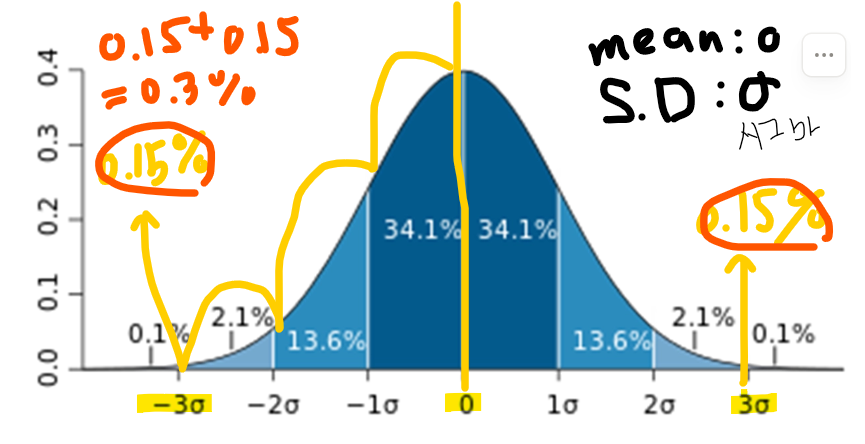
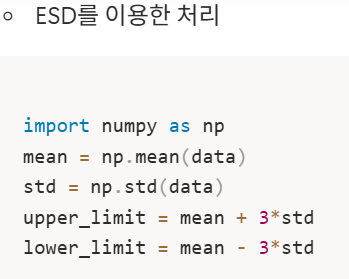
0.3%를 이상치라고 가정!! 할 수 있음
- IQR(Inter Quantile Range)를 이용한 이상치 발견
: ESD와 동일하게 데이터가 비대칭적이거나 샘플사이즈가 작은 경우 제한됨


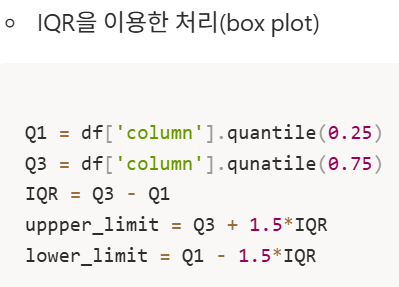
- 열 = column = series
- 조건필터링을 통한 삭제(a.k.a. boolean Indexing)
- 주관적인 값 → 그 데이터를 삭제 할지 말지는 분석가가 결정할 몫
- 다만, 이상치는 도메인과 비즈니스 맥락에 따라 그 기준이 달라짐
- 데이터 삭제 시 품질은 좋아 질 수 있지만 정보 손실을 동반하기 때문에 이상치 처리에 주의
- 이상 탐지(Anomaly Detection)이라는 이름으로 데이터에서 패턴을 다르게 보이는 개체 또는 자료를 찾는 방법으로도 발전 할 수 있습니다. 예를 들면 사기탐지, 사이버 보안 등 입니다.
- 실습
더보기
|
total_bill | total_bill이 종모양에 심한 비대칭은 아님 - pair plot에서 볼 수 있음
|
|
|
import numpy as np
|
|
|
#변수이름 mean
mean = np.mean(tips_df['total_bill'])
std = np.std(tips_df['total_bill'])
upper_limit = mean + 3*std
lower_limit = mean - 3*std
print(f"최대 : {upper_limit} \n최소 : {lower_limit}")
|
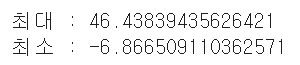 |
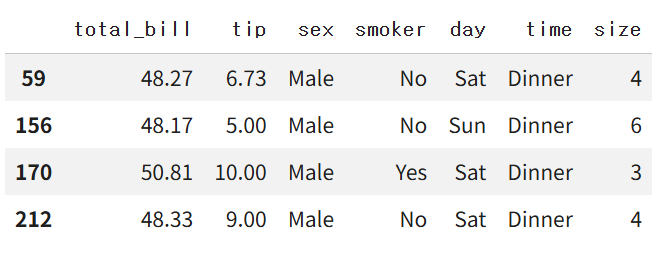
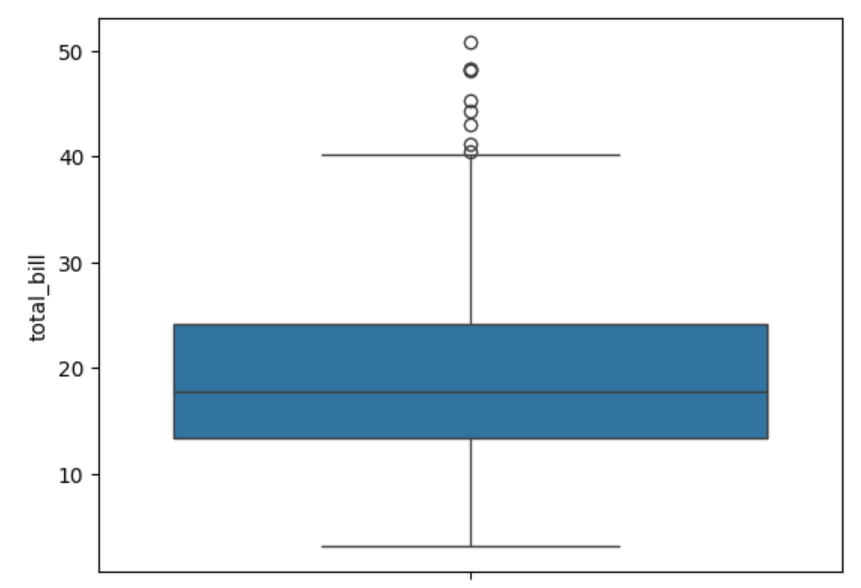
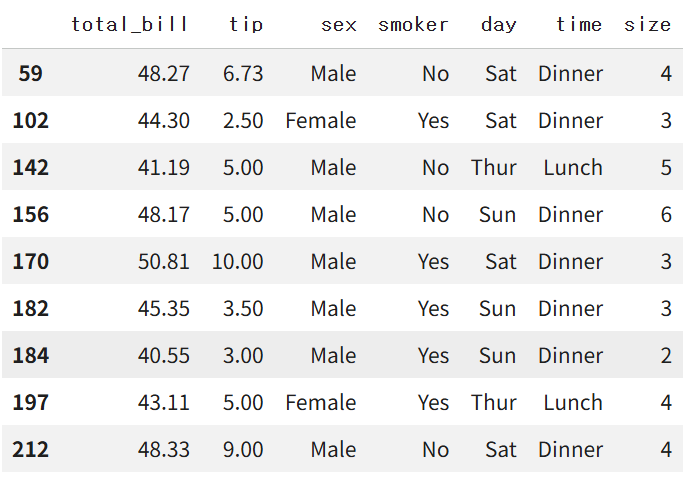
| 46보다 큰값 | -6보다 작은 값 → box plot에서 이상치 → 제거 |
|
|
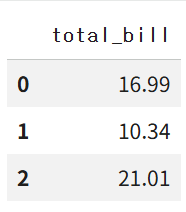
tips_df[['total_bill']].head(3)
|
 |
|
# 불리언 인덱싱
# cond=condition=조건
cond = tips_df['total_bill'] > upper_limit
cond
tips_df[cond]
|
  |
|
import seaborn as sns
#IQR을 이용한 이상치 확인(boxplot)
sns.boxplot(tips_df['total_bill'])
|
 |
|
Q1 = tips_df['total_bill'].quantile(0.25)
Q3 = tips_df['total_bill'].quantile(0.75)
IQR = Q3 - Q1
upper__limit = Q3 + 1.5*IQR
lower__limit = Q1 + 1.5*IQR
print(f"Q1 : {Q1} \nQ3 : {Q3} \nuper limit : {upper__limit} \nlower limit : {lower__limit}")
|
 |
|
cond2 = (tips_df['total_bill'] > upper__limit)
tips_df[cond2]
|
 |
● 1-5 결측치
데이터 전처리는 전체 분석 프로세스에서 90%를 차지 할 정도로 노동, 시간 집약적인 단계
이상치가 분포에 크게 어긋나는 특이한 데이터라면, 결측치(Missing Value)는 존재하지 않는 데이터
☑️ 결측치 = np.Nan = Nan ≒ Not a number
☑️ 결측치 처리 방법
- 수치형 데이터
- 평균 값 대치: 대표적인 대치 방법
- 중앙값 대치: 데이터에 이상치가 많아 평균 값이 대표성이 없다면 중앙 값을 이용
- Ex) 이상치는 평균 값을 흔들리게 함
- 범주형 데이터 : 최빈값 대치
간단한 삭제 & 대치 |
알고리즘 이용 |
| df.dropna(axis = 0): 행 삭제 df.dropna(axis = 1): 열 삭제 |
sklearn.impute.SimpleImputer:평균, 중앙, 최빈값으로 대치 - SimpleImputer.statistics_ : 대치한 값 확인 가능 sklearn.impute.IterativeImputer: 다변량대치(회귀 대치) sklearn.impute.KNNImputer: KNN 알고리즘을 이용한 대치 |
불리언 인덱싱 |
|
|
df.fillna(value) : 특정 값으로 대치(평균, 중앙, 최빈값)
|
- Imputation이라는 방법론으로 통계학에서도 많이 발전
K- Nearest Neighbors(k 최근접 이웃)이라는 방법 - 실습
더보기
결측치 데이터 : 타이타닉 데이터
|
import pandas as pd
titanic_df = pd.read_csv('/content/train.csv')
titanic_df.head()
|
 |
|
titanic_df.info()
#Age 데이터 결측치가 꽤 있음
|
 |
|
#결측치 삭제
#행으로 제거
titanic_df.dropna(axis = 0)
|
 |
|
#결측치 행으로 삭제 후 확인
titanic_df.dropna(axis = 0).info()
|
 |
|
titanic_df.info()
# 원본 titanic_df 멀쩡
|
|
|
# Age 컬럼의 nan만 삭제
# Age의 비어있는 값만 생성
# cond3 = (titanic_df['Age'].isna())
# titanic_df[cond3]
#notna = na가 아닌
cond3 = (titanic_df['Age'].notna())
titanic_df[cond3].info()
|
 |
|
#fillna 이용한 대치
age_mean = titanic_df['Age'].mean().round(2)
titanic_df['Age'].fillna(age_mean)
# titanic_df['Age'].fillna(age_mean,inpace = Ture)
# titanic_df 원본에 바로 적용
|
 |
|
titanic_df['Age_mean'] = titanic_df['Age'].fillna(age_mean)
titanic_df.info()
# Age_mean에는 결측치가 평균으로 채워저서 결측치가 없는 것 처럼 나옴
|
 |
|
# Simpleinputer는 보기만
from sklearn.impute import SimpleImputer
si = SimpleImputer()
# 타이타닉 데이터의 age 학습
si.fit(titanic_df[['Age']])
|
 |
|
si.statistics_
|
 |
|
titanic_df['Age_si_mean'] = si.transform(titanic_df[['Age']])
titanic_df.info()
|
 |
● 1-6 인코딩 : 범주형 자료 전처리
: 인코딩의 사전적 뜻 - 어떤 정보를 정해진 규칙에 따라 변환하는 것
: 머신러닝 모델은 숫자를 기반으로 학습하기 때문에 → 숫자가 아닌 데이터를 숫자로 변환
: 반드시 인코딩 과정이 필요
☑️ 레이블 인코딩(Label Encoding)
- 정의: 문자열 범주형 값을 고유한 숫자로 할당
- 장점 : 모델이 처리하기 쉬운 수치형으로 데이터 변환
- 단점 : 실제로는 그렇지 않은데, 순서 간 크기에 의미가 부여되어 모델이 잘못 해석 할 수 있음
- 숫자의 방향성이 중요!! 명목형 변수에 의미가 잘못부여 되면 잘못 해석할 수 있음
|
sklearn.preprocessing.LabelEncoder
|
|
|
|
☑️ 원-핫 인코딩(One-Hot Encoding)
- 정의: 각 범주를 이진 형식으로 변환하는 기법
|
- 장점: 각 범주가 독립적으로 표현되어, 순서가 중요도를 잘못 학습하는 것을 방지, 명목형 데이터에 권장
- 단점: 범주 개수가 많을 경우 차원이 크게 증가(차원의 저주) , 모델의 복잡도를 증가, 과적합 유발
| pd.get_dummies |
| sklearn.preprocessing.OneHotEncoder |
|
☑️ 실습
더보기
|
타이타닉 데이터 사용
타이타닉 데이터에 범주형 데이터가 꽤 있음
|
|
|
titanic_df.head(3)
|
 |
|
성별 - 라벨인코더
항구 - 원핫인코더
|
|
|
from sklearn.preprocessing import LabelEncoder, OneHotEncoder
le = LabelEncoder()
oe = OneHotEncoder()
|
|
|
le.fit(titanic_df[['Sex']])
|
 |
|
le.classes_
|
 |
|
le.transform(titanic_df[['Sex']])
#문자형 성별을 인코딩한 결과
|
 |
|
titanic_df['Sex_le'] = le.transform(titanic_df[['Sex']])
titanic_df.head(5)
|
 |
|
oe.fit(titanic_df[['Embarked']])
|
 |
|
oe.categories_
|
 |
|
oe.transform(titanic_df[['Embarked']])
|
|
|
embarked_csr = oe.transform(titanic_df[['Embarked']])
pd.DataFrame(embarked_csr.toarray(),columns = oe.get_feature_names_out())
|
 |
|
embarked_csr_df = pd.DataFrame(embarked_csr.toarray(),columns = oe.get_feature_names_out())
embarked_csr_df.head(3)
|
 |
|
#데이터 테이블 붙인다
#열과 열끼리 붙인다
pd.concat([titanic_df, embarked_csr_df], axis = 1)
|
 |
● 1-7 스케일 : 수치형 자료 전처리
: 서로 단위 값이 다르기 때문에 보정
☑️ 표준화 (Standardization)
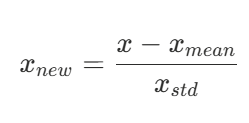
- 각 데이터에 평균을 빼고 표준편차를 나누어 평균을 0 표준편차를 1로 조정하는 방법 →정규 분포
- 수식
 |
ex) 1, 2, 3, 4, 5 평균 3 | 편차 √ (-2 ² + -1 ² + 0 + 1 ² + 2 ²) = √ 10 |
|
sklearn.preprocessing.StandardScaler
|
|
|
|
- 장점 : 이상치가 있거나 분포가 치우쳐져 있을 때 유용
: 모든 특성의 스케일을 동일하게 맞춤. 많은 알고리즘에서 좋은 성능 - 단점 : 데이터의 최소-최대 값이 정해지지 않음
☑️ 정규화 (Normaliztion)
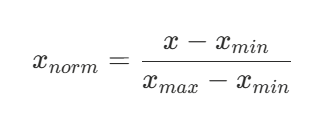
- 데이터를 0과 1사이 값으로 조정(최소값 0, 최대값 1)
- 수식
 |
- 비선형적 관계
|
sklearn.preprocessing.MinMaxScaler
|
|
|
|
- 장점 : 모든 특성의 스케일을 동일하게 맞춤
: 최대-최소 범위가 명확 - 단점 : 이상치에 영향을 많이 받을 수 있음(반대로 말하면 이상치가 없을 때(=고루 분포할 때) 유용)
☑️ 로버스트 스케일링 (Robust Scaling)
- 중앙값과 IQR을 사용하여 스케일링
 |
- 장점 : 이상치의 영향에 덜 민감
- 단점 : 표준화와 정규화에 비해 덜 사용됨
|
sklearn.preprocessing.RobustScaler
|
|
☑️ 실습
더보기
|
타이타닉 데이터의 수치형만 사용
* StandardScaler
* MinMaxScaler
|
|
|
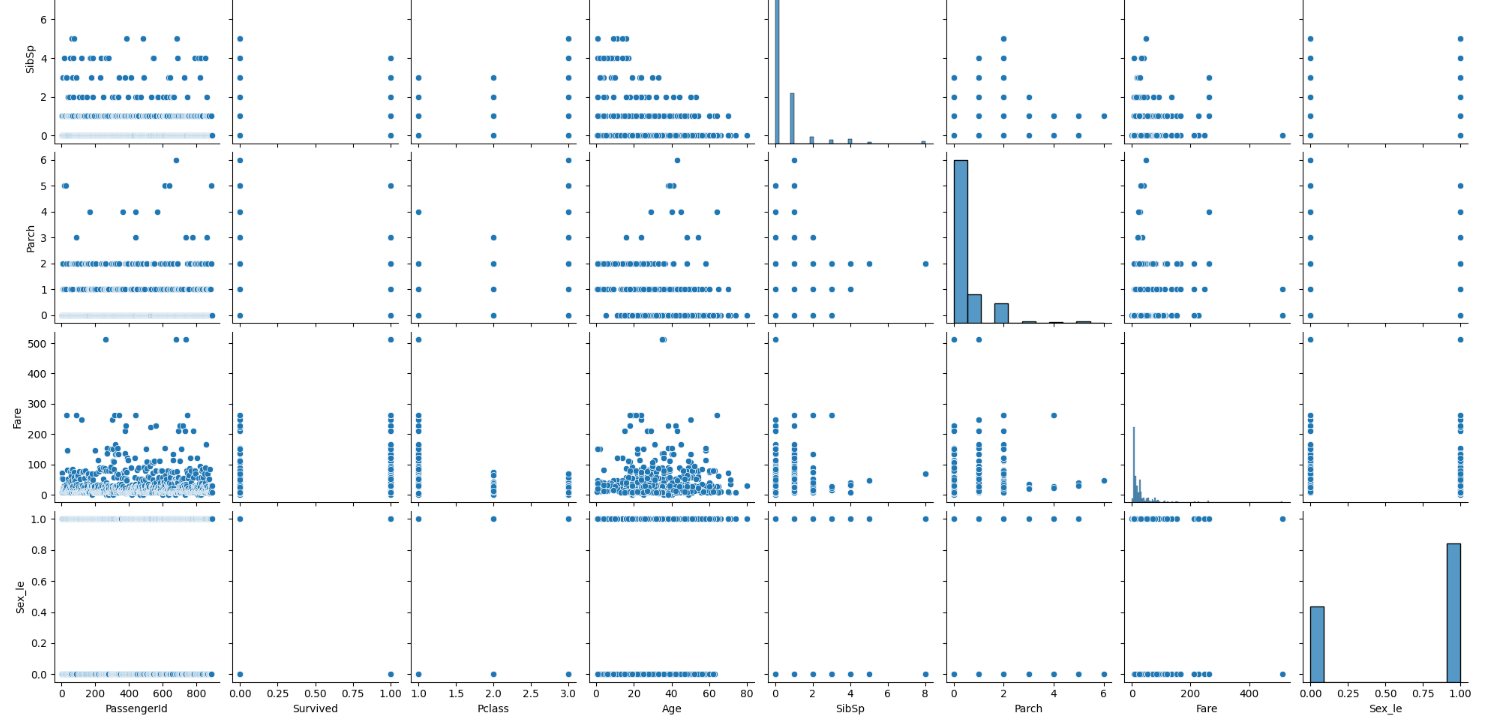
import seaborn as sns
sns.pairplot(titanic_df)
|
 |
|
#이산형 말고 연속형만,,,
titanic_df.info()
|
 |
|
* Pclass - 숫자 : 이산형
* Age
* Fare(요금)
|
|
| sns.pairplot(titanic_df[['Age', 'Fare']]) |  |
|
titanic_df[['Age', 'Fare']].describe()
|
 |
|
# age는 MinMAX
# Fare는 Standerd
|
|
|
from sklearn.preprocessing import MinMaxScaler, StandardScaler
mm_sc = MinMaxScaler()
sd_sc = StandardScaler()
|
|
|
age_mean = titanic_df['Age'].mean().round(2)
titanic_df['Age_mean'] = titanic_df['Age'].fillna(age_mean)
#학습
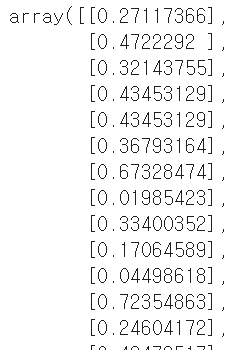
mm_sc.fit_transform(titanic_df[['Age_mean']])
|
 |
|
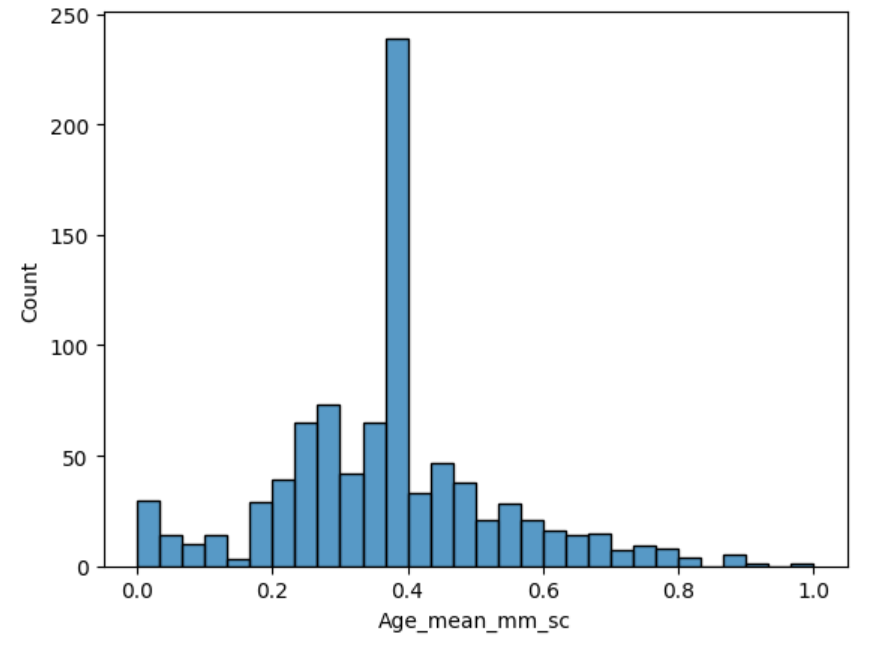
titanic_df['Age_mean_mm_sc'] = mm_sc.fit_transform(titanic_df[['Age_mean']])
titanic_df.head()
|
 |
|
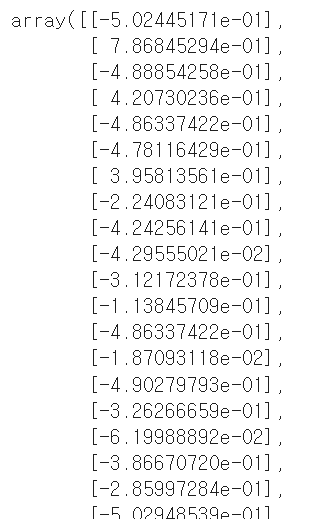
sd_sc.fit_transform(titanic_df[['Fare']])
|
 |
|
titanic_df['Fare_sd_sc'] = sd_sc.fit_transform(titanic_df[['Fare']])
titanic_df.head()
|
 |
|
sns.histplot(titanic_df['Age_mean_mm_sc'])
|
 |
|
sns.histplot(titanic_df['Fare_sd_sc'])
|
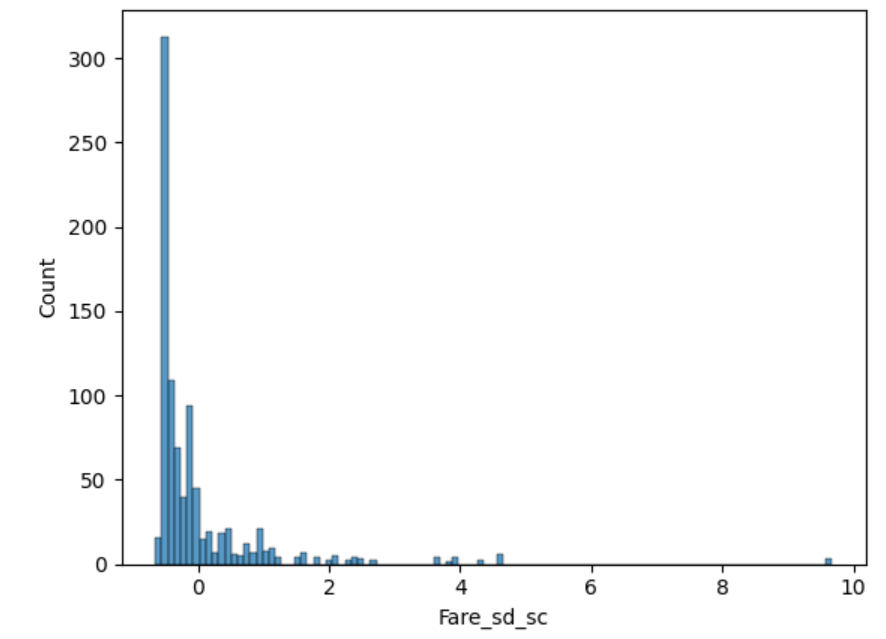 |
|
titanic_df.head(3)
|
 |
● 1-8 데이터 분리
☑️ 과적합(Overfitting)
- 데이터를 너무 과도하게 학습한 나머지 해당 문제만 잘 맞추고 새로운 데이터를 제대로 예측 혹은 분류하지 못하는 현상

- 모형이 지나치게 복잡할 때 : 과대 적합(이 될 수 있음)
- 모형이 지나치게 단순할 때 : 과소 적합( )
- 원인
- 모델의 복잡도(그래프 예시)
- 데이터 양이 충분하지 않음
- 학습 반복이 많음(딥러닝의 경우)
- 데이터 불균형(정상환자 - 암환자의 비율이 95: 5 - 암환자를 충분히 학습할 만큼의 데이터가 없기에;;;)
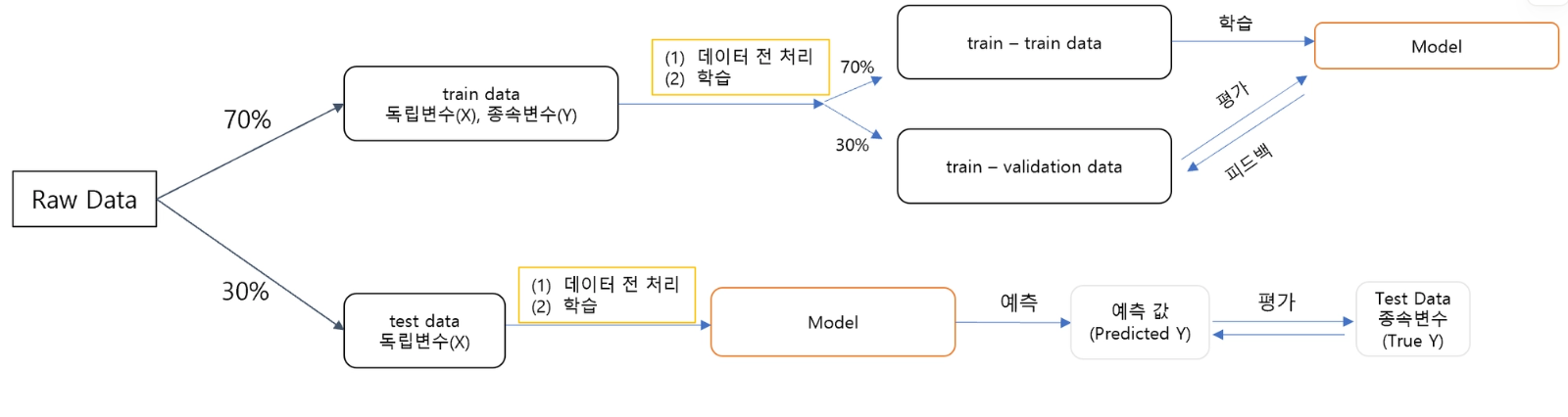
☑️ 과적합 해결 - 데스트 데이터의 분리
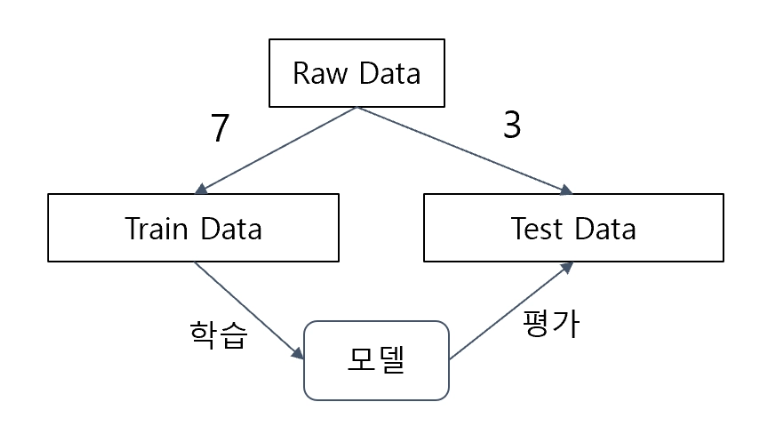

- Train F1 Score 와Test F1 Score의 간극이 크지 않아야 함
- Train > Test : 낮은 정도가 둘째 자리 정도 차이
- 학습 데이터(Train Data) : 모델 학습(fit)을 위한 데이터
- 데스트 데이터(Test Data) : 모델 평가를 위한 데이터
|
sklearn.model_selection.train_test_split
|
|
|
|
☑️ 실습
더보기
|
데이터 분리
* Train_test_split
* X 변수 : Fare, Sex
* Y 변수 : Survived
|
|
|
from sklearn.model_selection import train_test_split
X_train, X_test, y_train, y_test = train_test_split(titanic_df[['Fare', 'Sex']],
titanic_df[['Survived']],
test_size = 0.3,
shuffle= True, random_state= 42,
stratify=titanic_df[['Survived']])
#stratify : y값 고정 = 층화추출
|
|
|
print(X_train.shape, X_test.shape, y_train.shape, y_test.shape)
|
 |
|
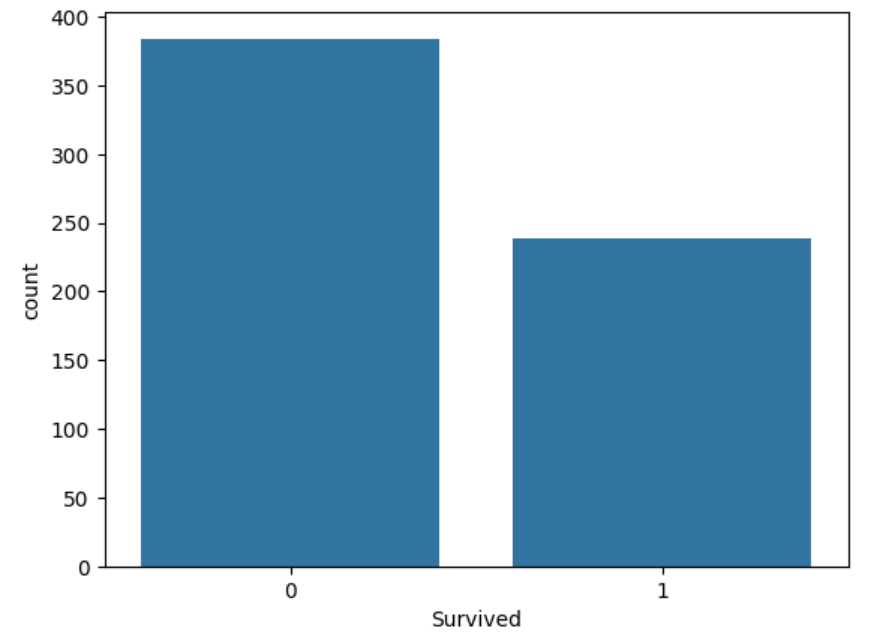
# 원자료 891개 Y값의 분포
sns.countplot(titanic_df, x='Survived')
# 사망한 사람의 비율이 더 많음
|
 |
|
# y train
sns.countplot(y_train, x='Survived')
|
 |
|
# y test
sns.countplot(y_test, x='Survived')
|
 |
|
Train 내용을 Test에 적용하면 안됨
Test는 어떠한 것도 하면 안됨 = 격리 데이터
Train 내용을 가져와서 Test에 적용
|
|
● 전체 실습
1. 데이터 로드 & 분리
|
2. 탐색적 데이터 분석(EDA)
|
3. 데이터 전처리
|
4. 모델 수립 | 5. 평가 |
더보기
|
import pandas as pd
import numpy as np
import seaborn as sns
import matplotlib.pyplot as plt
|
|
|
#titanic_df에서 train df
train_df = pd.read_csv("/content/train.csv")
test_df = pd.read_csv("/content/test.csv")
|
 |
|
train_df.info()
|
 |
|
train_df.describe(include='all')
|
 |
|
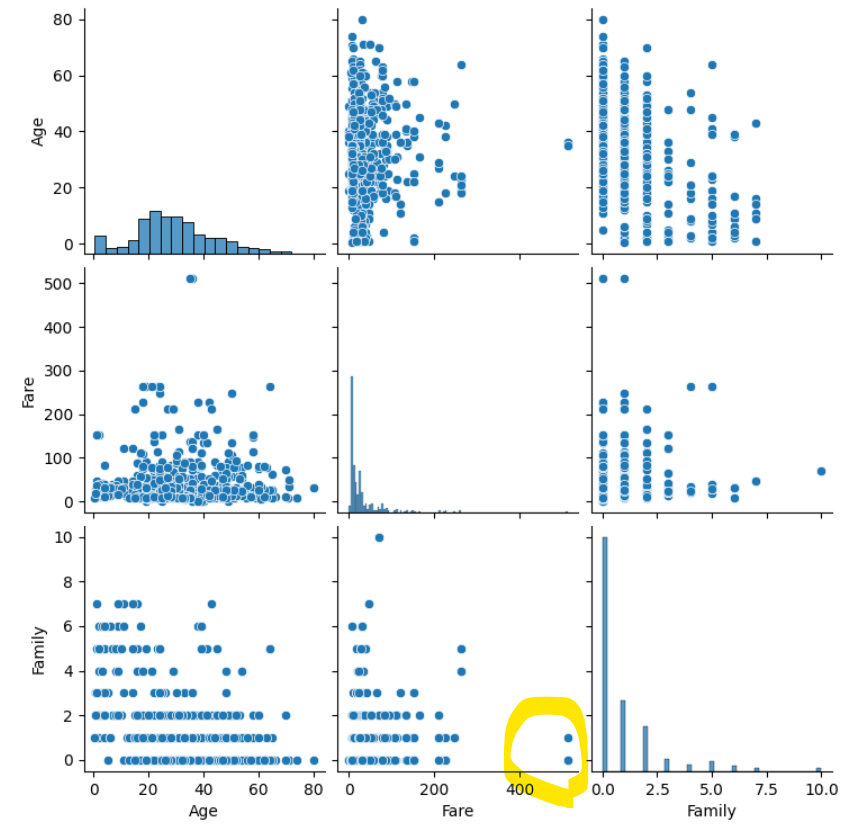
Fare요금에서 512 삭제
Sibsp + Parch 합쳐서 Family로 만들거임
|
|
|
#기초가공 : Family 변수생성
train_df_2 = train_df.copy()
def get_family(df):
df['Family'] = df['SibSp'] + df['Parch']
return df
get_family(train_df_2).head(3)
|
 |
|
#성별,요금,패밀리
#숫자형 변수들의 이상치를 확인하기 위하며 pairplot
sns.pairplot(train_df_2[['Age', 'Fare', 'Family']])
|
 |
|
train_df_2 = train_df_2[train_df_2['Fare']< 512]
|
|
|
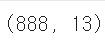
train_df_2.shape
|
 |
|
train_df_2[['Fare']].describe()
|
 |
|
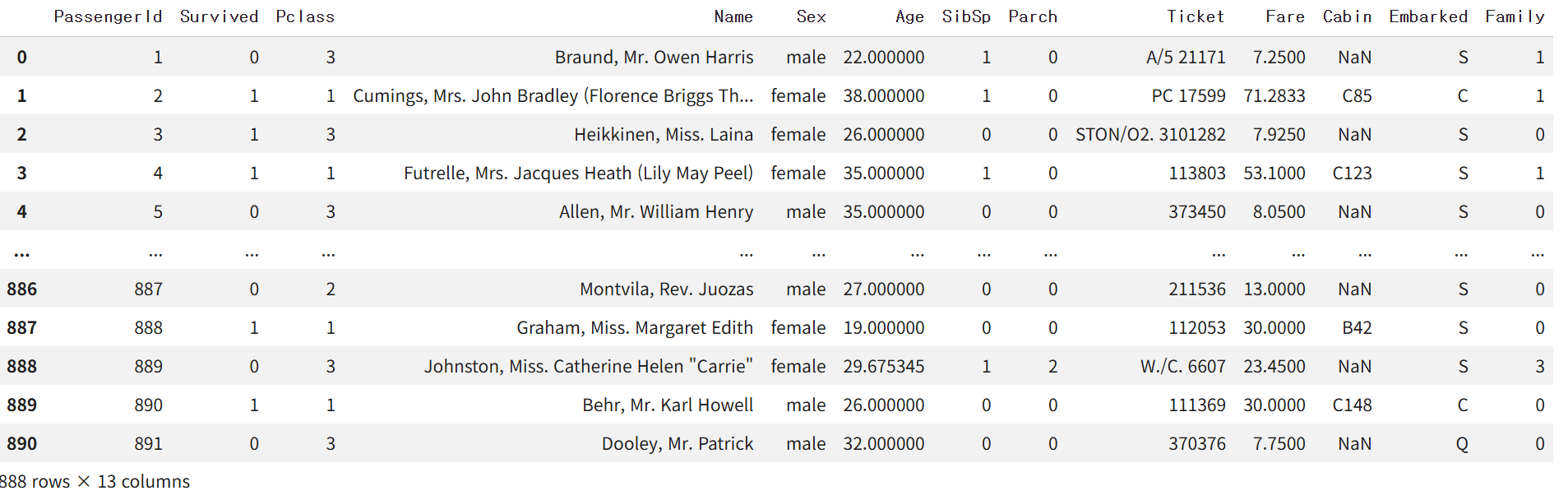
#결측치처리
def get_non_missing(df):
Age_mean = train_df_2['Age'].mean()
df['Age'] = df['Age'].fillna(Age_mean)
df['Embarked'] = df['Embarked'].fillna('S')
return df
get_non_missing(train_df_2)
|
 |
|
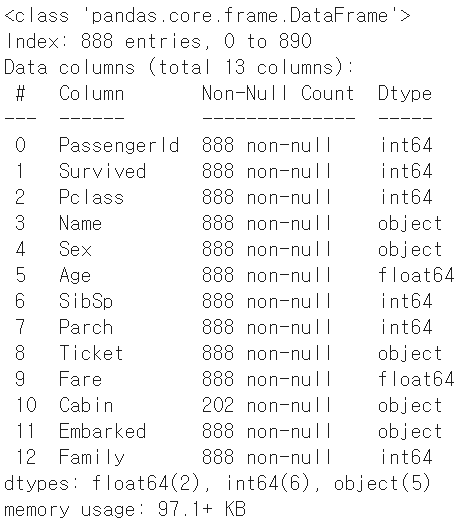
get_non_missing(train_df_2).info()
|
 |
|
### 전처리
* Family & Age - MinMax
* Fare - Standard
|
|
|
# 전처리 - 수치형
def get_numeric_sc(df):
# sd_sc:Fare | mm_sc:Family&Age
from sklearn.preprocessing import StandardScaler, MinMaxScaler
sd_sc = StandardScaler()
mm_sc = MinMaxScaler()
sd_sc.fit(train_df_2[['Fare']])
df[['Fare_sd_sc']] = sd_sc.transform(df[['Fare']])
mm_sc.fit(train_df_2[['Age', 'Family']])
df[['Age_mm_sc', 'Family_mm_sc']] = mm_sc.transform(df[['Age', 'Family']])
return df
get_numeric_sc(train_df_2).describe()
|
 |
|
def get_category(df):
from sklearn.preprocessing import LabelEncoder, OneHotEncoder
le = LabelEncoder()
le2 = LabelEncoder()
oe = OneHotEncoder()
le.fit(train_df_2[['Pclass']])
df['Pclass_le'] = le.transform(df['Pclass'])
le2.fit(train_df_2[['Sex']])
df['Sex_le'] = le2.transform(df['Sex'])
# Temporarily reset index for concatenation, but ensure unwanted index columns are dropped
df_temp = df.reset_index()
oe.fit(train_df_2[['Embarked']])
#데이터를 데이터 프레임으로 만들어서 연결해야함
embarked_csr = oe.transform(df_temp[['Embarked']])
embarked_csr_df = pd.DataFrame(embarked_csr.toarray(), columns = oe.get_feature_names_out())
df2 = pd.concat([df_temp, embarked_csr_df], axis = 1)
# Explicitly drop the 'index' and 'level_0' columns that were created by reset_index()
# These are not meant to be features for the model
if 'index' in df2.columns:
df2 = df2.drop('index', axis=1)
if 'level_0' in df2.columns:
df2 = df2.drop('level_0', axis=1)
return df2
|
|
|
get_category(train_df_2).info()
|
 |
|
train_df_2.head()
|
 |
|
def get_model(df):
from sklearn.linear_model import LogisticRegression
model_lor = LogisticRegression()
X = df[['Age_mm_sc', 'Fare_sd_sc', 'Family_mm_sc', 'Pclass_le', 'Sex_le', 'Embarked_C', 'Embarked_Q', 'Embarked_S']]
y = df[['Survived']]
model_lor.fit(X,y)
return model_lor
|
|
|
▽ 여기서부터 버벅버벅 ▽
|
|
|
# Ensure train_df_2 contains the one-hot encoded Embarked columns
# The previous call `get_category(train_df_2).info()` did not reassign the result to train_df_2
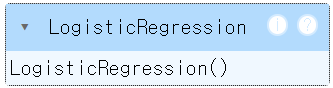
train_df_2 = get_category(train_df_2)
# Now, call get_model with the fully processed train_df_2
model_output = get_model(train_df_2)
model_output
|
 |
|
X = train_df_2[['Age_mm_sc', 'Fare_sd_sc', 'Family_mm_sc', 'Pclass_le', 'Sex_le', 'Embarked_C', 'Embarked_Q', 'Embarked_S']]
y_pred = model_output.predict(X)
#평가
from sklearn.metrics import accuracy_score, f1_score
#accuracy = 정확도
print(accuracy_score(train_df_2['Survived'], y_pred))
print(f1_score(train_df_2['Survived'], y_pred))
|
 |
|
## 테스트 데이터로 적용하기
|
|
|
test_df.head(3)
|
 |
|
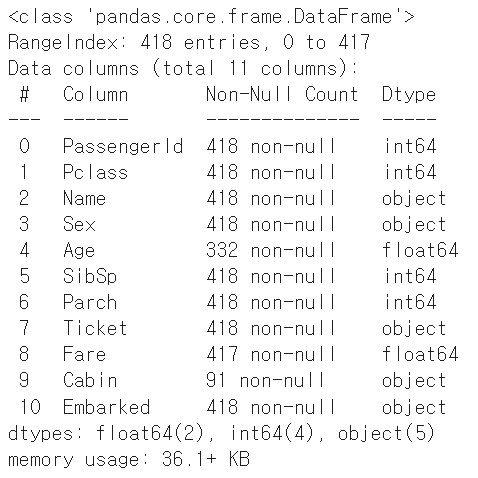
test_df.info()
|
 |
|
test_df_2 = get_family(test_df)
#get_non_missing(test_df_2).info()
test_df_2 = get_non_missing(test_df_2)
# Impute missing Fare in test_df_2 using the mean from train_df_2
# This ensures consistency and avoids data leakage
if 'Fare' in test_df_2.columns and test_df_2['Fare'].isnull().any():
fare_mean_from_train = train_df_2['Fare'].mean()
test_df_2['Fare'] = test_df_2['Fare'].fillna(fare_mean_from_train)
test_df_2 = get_numeric_sc(test_df_2)
test_df_2 = get_category(test_df_2)
type(model_output)
|
|
|
X_test = test_df_2[['Age_mm_sc', 'Fare_sd_sc', 'Family_mm_sc', 'Pclass_le', 'Sex_le', 'Embarked_C', 'Embarked_Q', 'Embarked_S']]
# Check for NaN values in X_test before prediction
nan_check = X_test.isnull().sum()
if nan_check.sum() > 0:
print("오류: X_test에 다음 열에 NaN 값이 포함되어 있습니다:")
print(nan_check[nan_check > 0])
# Fill NaN values to allow prediction to proceed
# Filling with 0 is a common strategy for scaled/encoded features,
# but a more sophisticated imputation might be considered for production.
X_test = X_test.fillna(0)
print("\nNaN 값을 0으로 채워서 예측을 계속 진행합니다.")
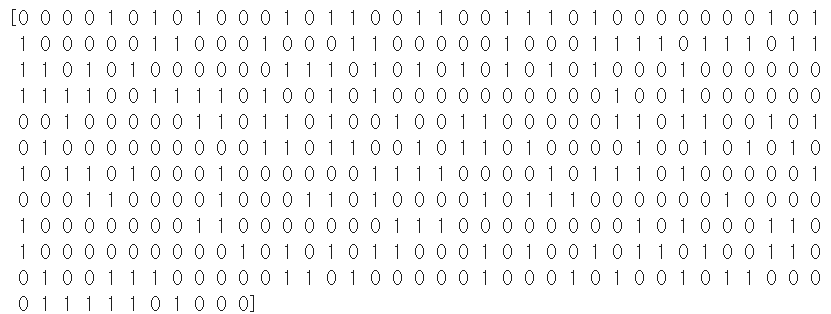
y_test_pred = model_output.predict(X_test)
print(y_test_pred)
|
 |
|
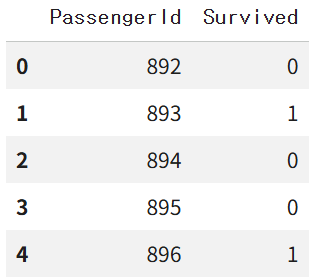
sub_df = pd.read_csv("/content/gender_submission.csv")
sub_df.head()
|
 |
|
sub_df['Survivied'] = y_test_pred
sub_df.head(10)
sub_df.to_csv("/content/result.csv", index=False)
|
|
● 1-13 교차 검증과 GridSearch
☑️ 교차검증(Cross Validation)
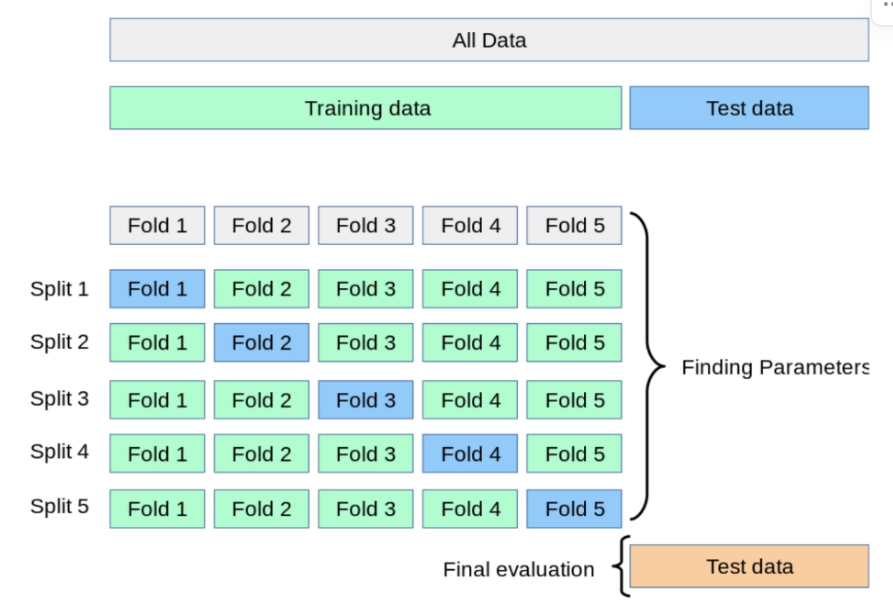
- 데이터 셋을 여러 개의 하위 집합으로 나누어 돌아가면서 검증 데이터로 사용하는 방법
- K-Fold Validation
- 정의: Train Data를 K개의 하위 집합으로 나누어 모델을 학습시키고 모델을 최적화 하는 방법
- 이때 K는 분할의 갯수
- Split 1: 학습용(Fold 2~5), 검증용(Fold1)
- Split 2: 학습용(Fold1, 3~5), 검증용(Fold2)
- Split 5까지 반복 후 최종 평가
- 특징 : 데이터가 부족할 경우 유용(반복학습)
|
☑️ 하이퍼 파라미터 자동적용하기 - Grid Search V
- 모델을 구성하는 입력 값 중 사람이 임의적으로 바꿀 수 있는 입력 값
☑️ 데이터 분석 프로세스 정리
'내일배움캠프(QC,QA_5기)' 카테고리의 다른 글
| [내일배움캠프_QA/QC 5기] 39일차 _ 팀 프로젝트 Day+2 (0) | 2026.04.30 |
|---|---|
| [내일배움캠프_QA/QC 5기] 37일차 _ 머신러닝 심화 완강 | 개인 과제 해설 (0) | 2026.04.28 |
| [내일배움캠프_QA/QC 5기] 36일차(1) _ 머신러닝 완강 (0) | 2026.04.27 |
| [내일배움캠프_QA/QC 5기] 35일차 _ 데이터 전처리&시각화 4강 (0) | 2026.04.25 |
| [내일배움캠프_QA/QC 5기] 33일차 _ 제약 데이터 분석 (0) | 2026.04.22 |